

The Cardiac Signal Processing Module is a one-click signal processing module in Biosignals Studio for analyzing heart activity recorded with Electrocardiography (ECG) and Blood Volume Pulse (BVP/PPG) sensors.
It cleans your cardiac signal, detects heartbeats, and extracts a complete set of heart rate and Heart Rate Variability (HRV) parameters in the time, frequency, and non-linear domains.
Paid Feature
This module is available with Biosignals Studio (Desktop) Academic & Commercial licenses and is not included in the free version of Biosignals Studio.
Learn more about the Biosignals Studio Academic License
Overview
The Cardiac Signal Processing Module:
- Displays the raw and filtered cardiac signals, so you can quickly check signal quality and the effect of the filters
- Extracts heartbeats (R-peaks in ECG signals, pulse peaks in BVP signals)
- Removes ectopic and other irregular beats to build a clean Normal-to-Normal Interval (NNI) series
- Plots a tachogram of heart rate and NN intervals over time, and an NNI histogram
- Extracts HRV parameters in the time domain, the frequency domain (Power Spectral Density), and the non-linear domain (Poincaré plot and NNI histogram)
The module is designed for the most common cardiac research use cases, such as comparing HRV at rest, during physical or mental workload, and during recovery.
This shows how quickly the heart adapts to a new workload and how well it returns to baseline afterwards.
New to processing modules? Learn how modules fit into your own custom processing pipeline:
Biosignals Studio: Signal Processing Pipeline Explained
Compatible Sensors & Systems
This module is compatible with the following cardiac sensors:
- Electrocardiography (ECG) Smart Sensor for Biosignals PRO
- Electrocardiography (ECG) sensor for biosignalsplux & Biosignals PRO
- Blood Volume Pulse (BVP) sensor for biosignalsplux & Biosignals PRO
- cardioBAN BLE
It is not compatible with the SpO2 and Pulse sensors or BITalino systems.
💡 Tip
ECG provides the most precise heartbeat timing and is the recommended sensor for HRV analysis. BVP is a convenient alternative for heart rate monitoring, but pulse peaks are less sharp than R-peaks and more sensitive to motion.
Quick-Start Guide
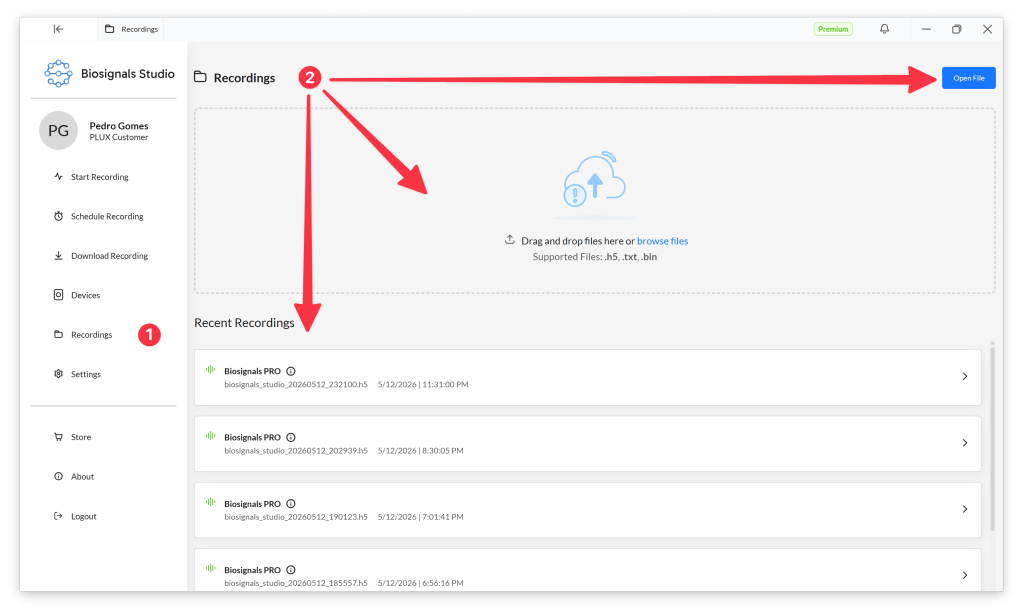
Select Recordings (1) in the Biosignals Studio side menu and open your ECG or BVP recording (2).
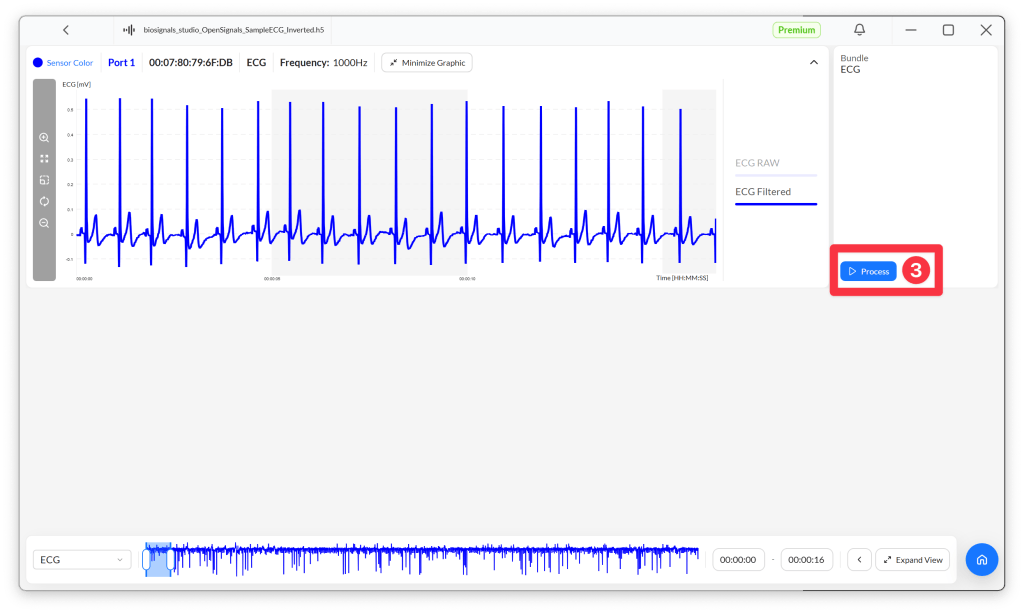
Select the ECG or BVP signal you want to process and press the Process button (3) next to it.
Biosignals Studio automatically suggests the Cardiac Signal Processing Module for ECG and BVP channels. Click Process Module (4) to start the signal processing.

The results are displayed in the lower half of the screen.

Pre-Processing
Before extracting any parameters, the module pre-processes the cardiac signal, detects the heartbeats, and builds a clean interval series in the following steps.
Powerline filtering
A notch filter at 50 Hz or 60 Hz removes interference from the electrical grid. You can select the frequency in the module settings.
No additional high-pass or low-pass filtering is applied: the PLUX cardiac sensors already limit the signal bandwidth to the relevant frequency range in hardware.
Heartbeat detection
In ECG signals, heartbeats are detected with the Pan-Tompkins algorithm, a widely validated method for detecting the QRS complex. It band-pass filters, differentiates, squares, and smooths the signal to emphasize each QRS complex, then applies adaptive amplitude and timing thresholds that update with every detected R-peak. This makes it robust in noisy recordings.
In BVP signals, the module detects the systolic peak of each pulse wave.
From RR intervals to NN intervals
The time between consecutive heartbeats forms the RR Interval (RRI) series. Not every interval reflects the normal heart rhythm, though. Ectopic beats, such as premature ventricular contractions, and missed or false detections, for example caused by noise, produce intervals that are unusually short or long.
The module therefore checks every RR interval in two steps:
- Physiological range: intervals shorter than the minimum RR interval (default: 0.3 s, equal to 200 bpm) or longer than the maximum RR interval (default: 1.5 s, equal to 40 bpm) are treated as irregular.
- Local consistency: each interval is compared with the average of its neighbouring beats (default: 20 beats before and 20 beats after). Intervals that deviate from this local average by more than the acceptance margin (default: 20%) are treated as irregular.
The remaining intervals form the Normal-to-Normal Interval (NNI) series, which is the input for all HRV parameters. Both the RRI and the NNI series can be exported.
Module Settings
The Processing Module Settings window lets you adjust how the module builds the NNI series, the range of the PSD graph, and the powerline filter. Use Reset to restore the default values.
| Setting | Default | Description |
|---|---|---|
| Minimum RR interval | 0.3 s | Shortest RR interval accepted as a normal heartbeat (0.3 s corresponds to 200 bpm). Shorter intervals are treated as irregular. Lower it only for participants with very high heart rates. |
| Maximum RR interval | 1.5 s | Longest RR interval accepted as a normal heartbeat (1.5 s corresponds to 40 bpm). Longer intervals are treated as irregular. Increase it for participants with very low resting heart rates, such as endurance athletes. |
| Neighbour beats before/after | 20 | Number of beats before and after each interval used to compute the local average. More beats give a more stable reference; fewer beats adapt faster to quick changes in heart rate. |
| Acceptance margin | 20% | Maximum deviation of an interval from the local average before it is treated as irregular. Lower values remove more beats; higher values keep more beats, including possible artifacts. |
| PSD graph maximum frequency | 0.4 Hz | Upper frequency limit of the Power Spectral Density graph. The default covers all HRV frequency bands up to the end of the HF band. |
| Notch frequency | 50 Hz | Removes powerline interference. Select 50 Hz (Europe, most of Asia and Africa) or 60 Hz (Americas and parts of Asia). |
Heart Rate Variability (HRV) Parameters
All HRV parameters are computed from the NNI series and follow the Heart Rate Variability guidelines of the European Society of Cardiology and the North American Society of Pacing and Electrophysiology. The module extracts three groups of parameters:
- Time domain: statistics of the NN intervals and their successive differences
- Frequency domain: how the variability is distributed across frequency bands
- Non-linear: the shape of the Poincaré plot and of the NNI histogram
Time Domain Parameters
The tachogram shows the heart rate and NN intervals over time, and the NNI histogram shows how often each interval duration occurs.
| Parameter | Unit | Description | In practice |
|---|---|---|---|
| Mean, Minimum, Maximum Heart Rate | bpm | Average, lowest, and highest heart rate in the analyzed segment. | How fast your participant’s heart beat, and how much it sped up or slowed down. |
| SDNN | ms | Standard deviation of all NN intervals. | Overall variability; higher values mean a more variable heart rhythm. Only compare SDNN between recordings of the same length. |
| RMSSD | ms | Root mean square of successive differences between consecutive NN intervals. | Short-term, beat-to-beat variability, mainly driven by parasympathetic (vagal) activity; often drops under stress or fatigue. |
| SDSD | ms | Standard deviation of successive differences between consecutive NN intervals. | Short-term variability, closely related to RMSSD. |
| NN50 | – | Number of successive differences larger than 50 ms. | How often the heart rhythm changed markedly from one beat to the next. |
| pNN50 | % | NN50 relative to the total number of NN intervals. | Like NN50, but comparable across recordings of different lengths; reflects parasympathetic activity. |
Long-term parameters
These parameters are computed from 5-minute segments and are designed for long-term recordings (typically 24 hours).
| Parameter | Unit | Description | In practice |
|---|---|---|---|
| SDNN Index | ms | Mean of the SDNN values of all 5-minute segments. | The typical short-term variability throughout the day. |
| SDANN | ms | Standard deviation of the mean NN interval of all 5-minute segments. | Long-term variability, such as day-night (circadian) changes in heart rate. |
⚠️ Recording length matters
Long-term parameters are not computed for recordings shorter than 10 minutes, as they do not contain enough 5-minute segments.
For recordings shorter than 24 hours, the values are still displayed, but their statistical relevance is limited. Please evaluate whether these metrics fit your use case conditions.
Frequency Domain Parameters
The module computes the Power Spectral Density (PSD) of the NNI series using Welch’s method with a Hamming window, and splits it into the following frequency bands:
| Band | Frequency range | Notes |
|---|---|---|
| Ultra Low Frequency (ULF) | 0.000 to 0.003 Hz | Only computed for recordings longer than 24 hours |
| Very Low Frequency (VLF) | 0.003 to 0.040 Hz | 0.000 to 0.040 Hz when ULF is not computed |
| Low Frequency (LF) | 0.040 to 0.150 Hz | – |
| High Frequency (HF) | 0.150 to 0.400 Hz | – |
For each band, the module extracts the following parameters:
| Parameter | Unit | Description | In practice |
|---|---|---|---|
| Total Power | ms² | Sum of the PSD across all frequency bands. | Overall variability, comparable to SDNN. |
| Absolute Power | ms² | Sum of the PSD within a band. | How much variability occurs at that band’s rhythm. HF mainly reflects breathing-related (parasympathetic) variability; LF reflects a mix of sympathetic and parasympathetic activity and blood pressure regulation; VLF reflects slow regulatory processes and needs long recordings. |
| Relative Power | % | Absolute power of a band relative to the total power. | Which band dominates the overall variability. |
| Logarithmic Power | log(ms²) | Natural logarithm of the absolute power of a band. | Makes the strongly skewed power values easier to compare statistically. |
| Normalized Power (LF and HF only) | n.u. | Absolute power of LF or HF relative to the sum of LF and HF power. | Compares LF and HF while ignoring the VLF band. |
| LF/HF Ratio | – | LF absolute power divided by HF absolute power. | Often used as an indicator of the balance between sympathetic and parasympathetic activity, although this interpretation is debated in the literature. |
Non-Linear Parameters
The Poincaré plot plots each NN interval against the next one. A healthy, variable heart rhythm produces a cloud of points elongated along the identity line (y = x), summarized by an ellipse whose radii are SD1 and SD2. SD1 and SD2 are derived from the standard deviations of the NN intervals (STD RR) and of their successive differences (STD RR Diff).
The Triangular Index and TINN describe the shape of the NNI histogram. Because they are based on the overall distribution of the intervals, they are less sensitive to single artifacts or remaining irregular beats.
| Parameter | Unit | Description | In practice |
|---|---|---|---|
| SD1 | ms | Standard deviation of the Poincaré plot perpendicular to the identity line (minor axis). | Short-term, beat-to-beat variability; mathematically related to RMSSD. |
| SD2 | ms | Standard deviation of the Poincaré plot along the identity line (major axis). | Long-term variability. |
| SD1/SD2 | – | SD1 divided by SD2. | Balance between short-term and long-term variability. |
| STD RR | ms | Standard deviation of all NN intervals (equivalent to SDNN), used to compute SD2. | Overall variability of the heart rhythm. |
| STD RR Diff | ms | Standard deviation of the successive differences between NN intervals (equivalent to SDSD), used to compute SD1. | Short-term, beat-to-beat variability. |
| Triangular Index | – | Total number of NN intervals divided by the number of intervals in the most frequent bin of the NNI histogram. | Overall variability; higher values mean a broader distribution of intervals and a more variable heart rhythm. |
| TINN | ms | Triangular Interpolation of the NN interval histogram: the baseline width of the triangle that best fits the histogram. | Overall variability; a wider triangle means the NN intervals cover a broader range of durations. |
Tips & Tricks
Choose the right recording length
HRV parameters depend strongly on recording length, so always compare segments of the same duration.
For short-term HRV analysis, 5-minute segments are the standard. Frequency-domain parameters need enough data to capture their band: at least 1 minute for HF and 2 minutes for LF, while VLF cannot be assessed reliably from recordings of 5 minutes or less.
Process multiple time windows in the same recording
You can apply the processing module to different segments of your recording. This is particularly useful if a single recording contains multiple phases, for example:
- 00:30 to 05:30: pre-exercise baseline
- 06:00 to 11:00: exercise
- 12:00 to 17:00: recovery
To do this, adjust the time window using the time axis at the bottom of the screen, then click Process after each selection.

Biosignals Studio does not overwrite previously processed time windows. You’ll find all processed segments in the Time dropdown menu at the top of the module.
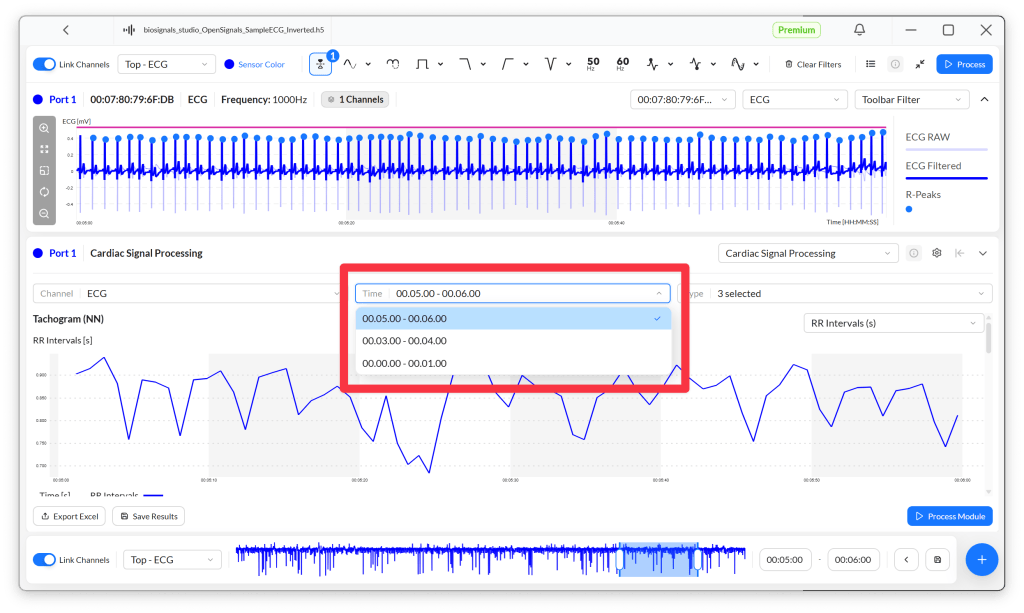
To delete a processed segment, click the list icon in the toolbar at the top of the screen and use the bin icon next to the segment.

Datasheet
The datasheet describes the module’s technical implementation in detail, including the pre-processing steps, the formulas used to compute each parameter, and the referenced scientific literature.
