

The Electromyography (EMG) Processing Module is a one-click signal processing module in Biosignals Studio for analyzing muscle activity recorded with surface EMG sensors.
It cleans your EMG signal, detects every muscle contraction, normalizes contraction amplitudes to the Maximum Voluntary Contraction (MVC), tracks muscle fatigue over time, and extracts temporal, amplitude, and spectral parameters for each contraction and for the entire signal.
Paid Feature
This module is available with Biosignals Studio (Desktop) Academic & Commercial licenses and is not included in the free version of Biosignals Studio.
Learn more about the Biosignals Studio Academic License
Overview
The EMG Processing Module:
- Displays the raw and pre-processed EMG signals, so you can quickly check signal quality, noise, artifacts, and electrode contact
- Automatically detects and highlights muscle activations (contractions)
- Computes the Maximum Voluntary Contraction (MVC) from your recording
- Tracks muscle fatigue over time with the Fatigue Index
- Extracts EMG parameters for every contraction, with averages and variability across all contractions, plus spectral parameters for the entire signal
The module is designed for the most common EMG research use cases, including biomechanics, ergonomics, physiotherapy research, and muscle fatigue analysis.
New to processing modules? Learn how modules fit into your own custom processing pipeline:
Biosignals Studio: Signal Processing Pipeline Explained
Compatible Sensors & Systems
This module is compatible with the following surface EMG sensors:
- Electromyography (EMG) Smart Sensor for Biosignals PRO
- Electromyography (EMG) Sensor for biosignalsplux
- muscleBAN BLE
It is not compatible with BITalino systems.
Quick-Start Guide
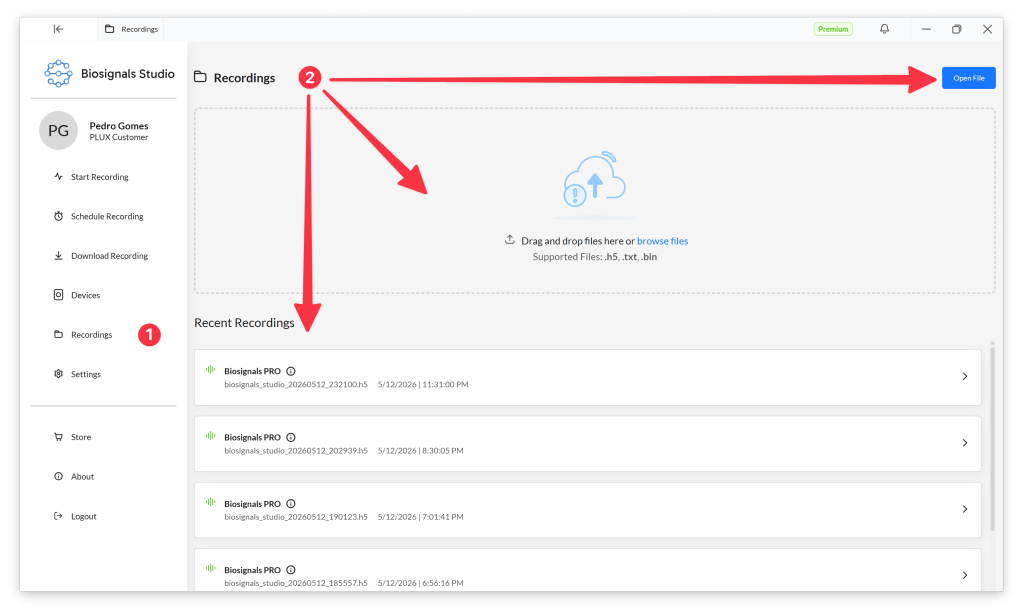
Select Recordings (1) in the Biosignals Studio side menu and open your EMG recording (2).
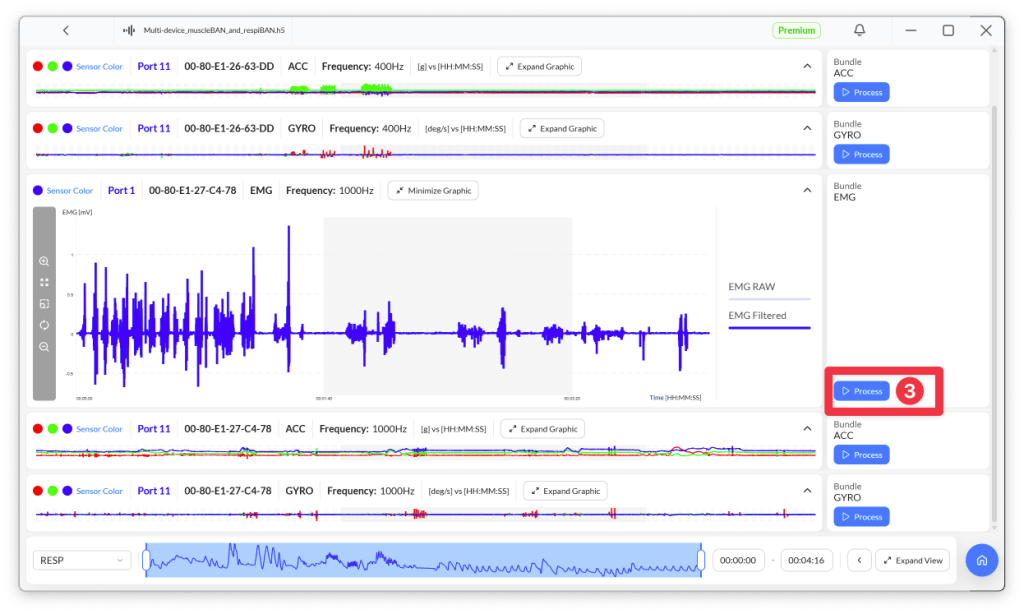
Select the EMG signal you want to process and press the Process button (3) next to it.
Biosignals Studio automatically suggests the EMG Processing Module for EMG channels. Click Process Module (4) to start the signal processing.
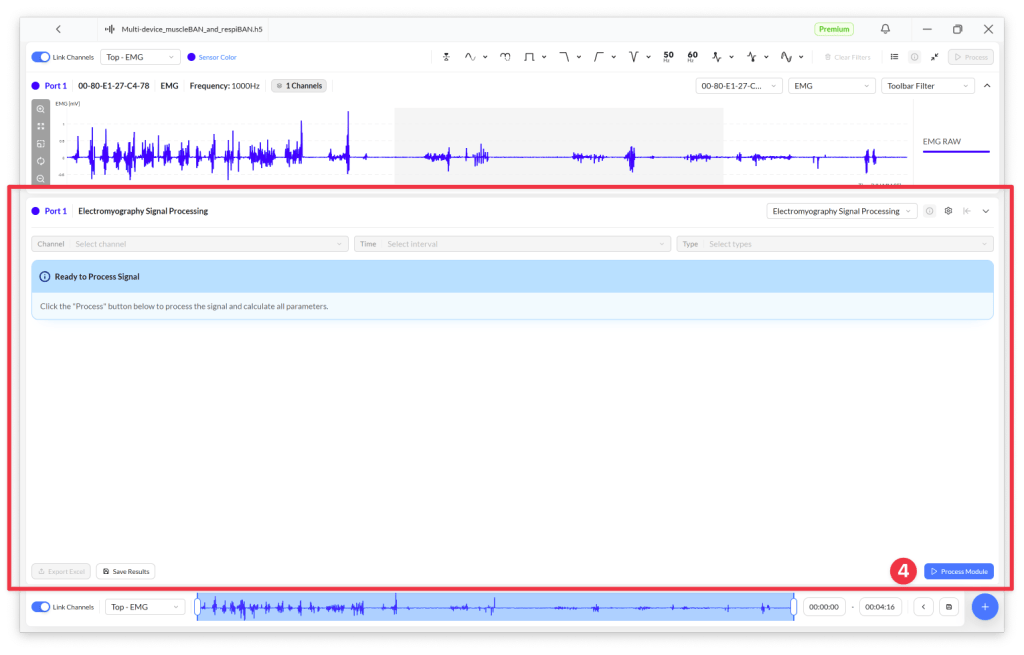
The results are displayed in the lower half of the screen.

Pre-Processing
Before extracting any parameters, the module filters the EMG signal to remove noise and interference. The filtered signal is the basis of all EMG parameters.
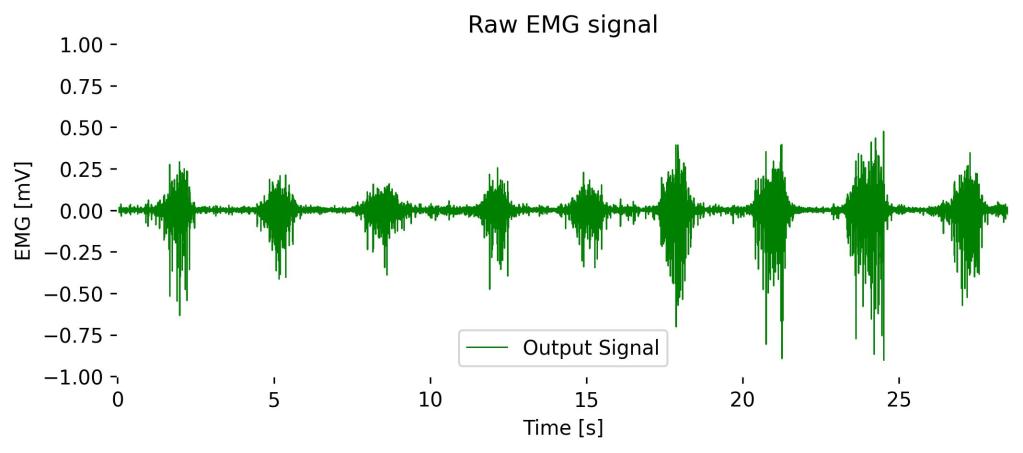
Band-pass and powerline filtering
The EMG signal is filtered with a 4th order Butterworth band-pass filter (20 Hz to 450 Hz). This removes movement artifacts and baseline drift below 20 Hz and high-frequency noise above 450 Hz, while preserving the frequency range that contains most of the surface EMG power.
A notch filter at 50 Hz or 60 Hz then removes interference from the electrical grid.
Muscle activation detection
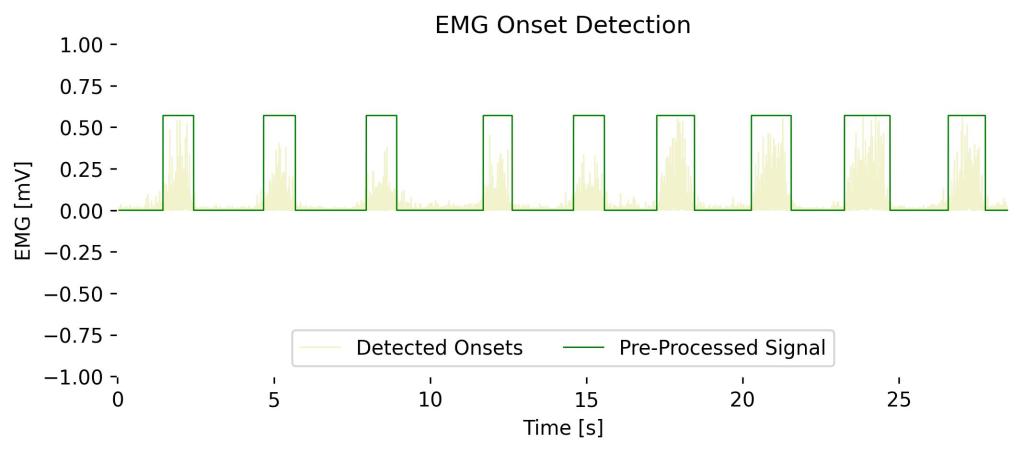
To detect muscle contractions (onsets), the module first prepares the filtered signal in two steps:
- Full-wave rectification: all negative values are converted into positive values, which makes muscle bursts easier to see and to detect.
- Amplitude artifact rejection: short, non-physiological spikes, such as motion artifacts or electrode pops, are suppressed with z-score clipping. Because this method uses the amplitude distribution of the entire signal, it only clips rare statistical outliers and leaves genuine muscle activations untouched.
The module then detects contractions by comparing a smoothed version of this signal with an onset threshold:
- The signal is smoothed over the tolerance window, which merges short gaps within the same contraction.
- If you leave the onset threshold empty, it is estimated automatically from the first second of the signal: the mean of this baseline plus four times its standard deviation.
- Every continuous interval above the threshold is stored as one contraction, with its start and end time.
Tip: Start your recording at rest
The automatic threshold assumes that the muscle is relaxed during the first second of the analyzed segment.
If your participant is already contracting the muscle at that point, the threshold will be too high and weaker contractions may be missed. In this case, enter an onset threshold manually in the module settings.
Maximum Voluntary Contraction (MVC)
The MVC is the reference amplitude used to express each contraction as a percentage of the participant’s maximum muscle strength. This makes amplitudes comparable between muscles, participants, and recordings.
The MVC is the average of the 3 highest contraction maxima in the analyzed segment.
Tip: MVC recordings
Computing the MVC from your recording only works well if it contains true maximum contractions.
For accurate %MVC results, record your MVC contractions at the beginning of your recording, for example 3 maximum contractions of about 5 seconds each, with rest in between.
Module Settings

The Processing Module Settings window lets you adjust how the module detects contractions, computes the Fatigue Index, and removes powerline interference. Use Reset to restore the default values.
| Setting | Default | Description |
|---|---|---|
| Tolerance window | 800 samples | Smoothing window applied before thresholding. Larger windows merge nearby bursts into one contraction; smaller windows separate them. |
| Fatigue window size | 5 s | Length of each signal window used to compute the Fatigue Index. Shorter windows show faster changes; longer windows give more stable values. |
| Fatigue overlap ratio | 0.5 | Overlap between consecutive Fatigue Index windows, from 0 (no overlap) to just below 1. Higher overlap gives more data points and smoother results. |
| Onset threshold (optional) | Empty (automatic) | Amplitude above which the muscle is considered active. Leave it empty to estimate the threshold automatically. Increase it if noise is detected as contractions; decrease it if weak contractions are missed. |
| Notch frequency | 50 Hz | Removes powerline interference. Select 50 Hz (Europe, most of Asia and Africa) or 60 Hz (Americas and parts of Asia). |
EMG Parameters
The module extracts four types of results:
- Global parameters: computed over the entire analyzed segment
- Contraction parameters: computed for every individual contraction
- Spectral parameters: computed from the frequency content of the entire pre-processed signal
- Fatigue Index: computed for consecutive time windows to show how the spectrum changes over time
Global Parameters
| Parameter | Unit | Description | In practice |
|---|---|---|---|
| Number of Contractions | – | Number of muscle activations detected in the segment. | How often the muscle was activated, for example the number of repetitions in an exercise. |
| Contraction Frequency | contractions/min | Number of contractions divided by the duration of the segment. | How frequently the muscle was activated; useful for comparing segments of different lengths. |
Contraction Parameters
The following parameters are extracted for each individual contraction. For all parameters except Contraction Start and Contraction End, the module also reports the average, standard deviation, and variance across all contractions.
| Parameter | Unit | Description | In practice |
|---|---|---|---|
| Contraction Start | s | Time at which the contraction begins. | Lets you locate each contraction in your recording. |
| Contraction End | s | Time at which the contraction ends. | Lets you locate each contraction in your recording. |
| Duration | s | Time between contraction start and end. | How long the muscle stayed active. |
| Maximum Amplitude | mV | Highest amplitude of the pre-processed signal within the contraction. | The peak activation level of the muscle during this contraction. |
| % of MVC | % | Maximum amplitude relative to the MVC. | How strong the contraction was compared to the participant’s maximum; comparable between participants and muscles. |
| Time to Peak | s | Time from contraction start to the maximum amplitude. | How quickly the muscle reached its peak activation; shorter times indicate more explosive contractions. |
| Pre-Onset Interval | s | Resting time between the previous contraction and this one. | How long the muscle rested before this contraction. |
| Post-Onset Interval | s | Resting time between this contraction and the next one. | How long the muscle rested after this contraction. |
| Mean Absolute Value (MAV) | mV | Average absolute amplitude within the contraction. | The overall activation level during the contraction; less sensitive to single peaks than the maximum amplitude. |
Spectral Parameters
The module computes the Power Spectral Density (PSD) of the entire pre-processed signal using Welch’s method. As a muscle fatigues, its EMG power shifts toward lower frequencies, which makes these parameters useful fatigue indicators.
| Parameter | Unit | Description | In practice |
|---|---|---|---|
| Mean Frequency | Hz | Power-weighted average frequency of the spectrum. | Decreases as the muscle fatigues. |
| Median Frequency | Hz | Frequency that divides the spectrum into two halves of equal power. | The most common EMG fatigue indicator; decreases as the muscle fatigues and is less sensitive to noise than the mean frequency. |
| Peak Frequency | Hz | Frequency with the highest power. | The dominant frequency of the muscle activity. |
| Total Power | mV² | Area under the power spectrum. | Overall energy of the muscle activity in the segment. |
| High/Low Power Ratio | – | Power in the 150 to 450 Hz band divided by the power in the 20 to 150 Hz band. | Decreases as the muscle fatigues and power shifts toward lower frequencies. |
Fatigue Index
The Fatigue Index shows how muscle fatigue develops over time. The module splits the pre-processed signal into windows of the fatigue window size (default: 5 s), which overlap according to the fatigue overlap ratio (default: 0.5).
For each window, it computes the High/Low Power Ratio, resulting in a Fatigue Index series over time.
| Parameter | Unit | Description | In practice |
|---|---|---|---|
| Fatigue Index | – | High/Low Power Ratio (150 to 450 Hz vs. 20 to 150 Hz) of each time window. | A decreasing trend over time indicates that the muscle is fatiguing, as its power shifts toward lower frequencies. |
Tips & Tricks
Jump to the parameters of an onset
In longer recordings, it can be difficult to find the metrics of a specific onset in the middle of your signal. Click directly on the signal to highlight a selected onset and its metrics.
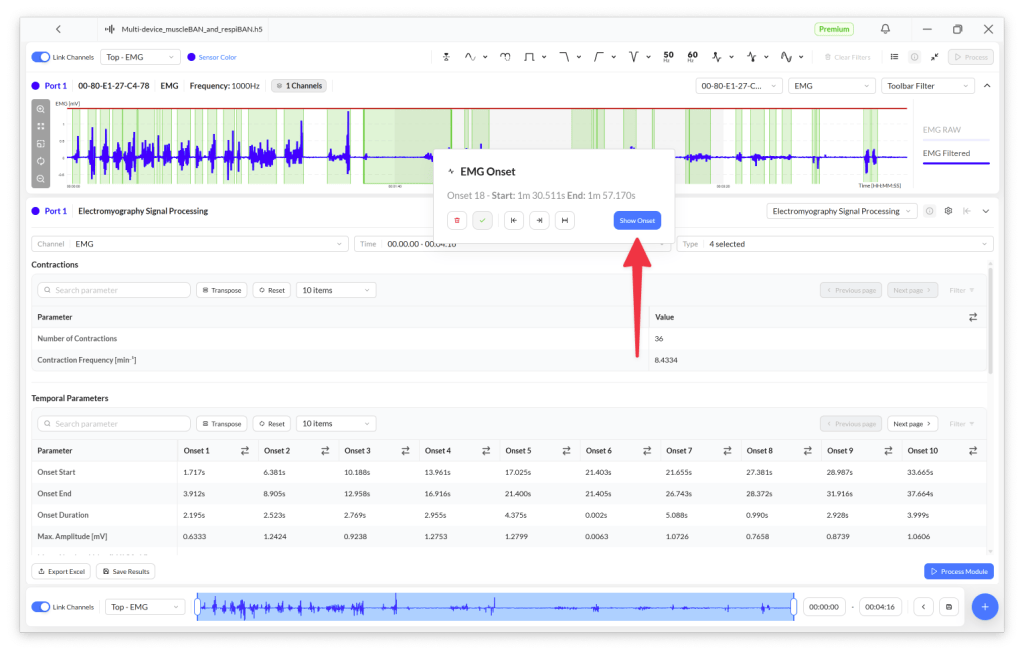
The graph zooms in on the selected onset, and the results table jumps to the onset’s entry.
Exclude contractions (and restore them)
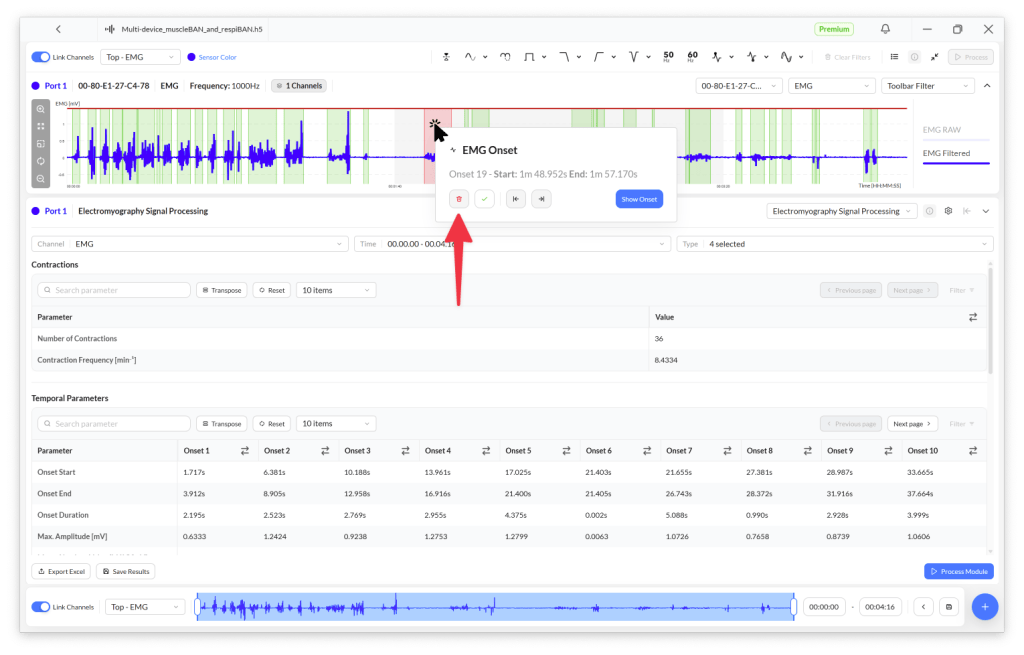
You can manually exclude detected onsets (muscle contractions) by left-clicking the onset in the graph and clicking the bin icon.
The onset remains visible in the graph, but turns red and is excluded from your results table.
To restore an excluded onset, click the red onset and then the checkmark button. The onset turns green again and its parameters are added back to the results table.
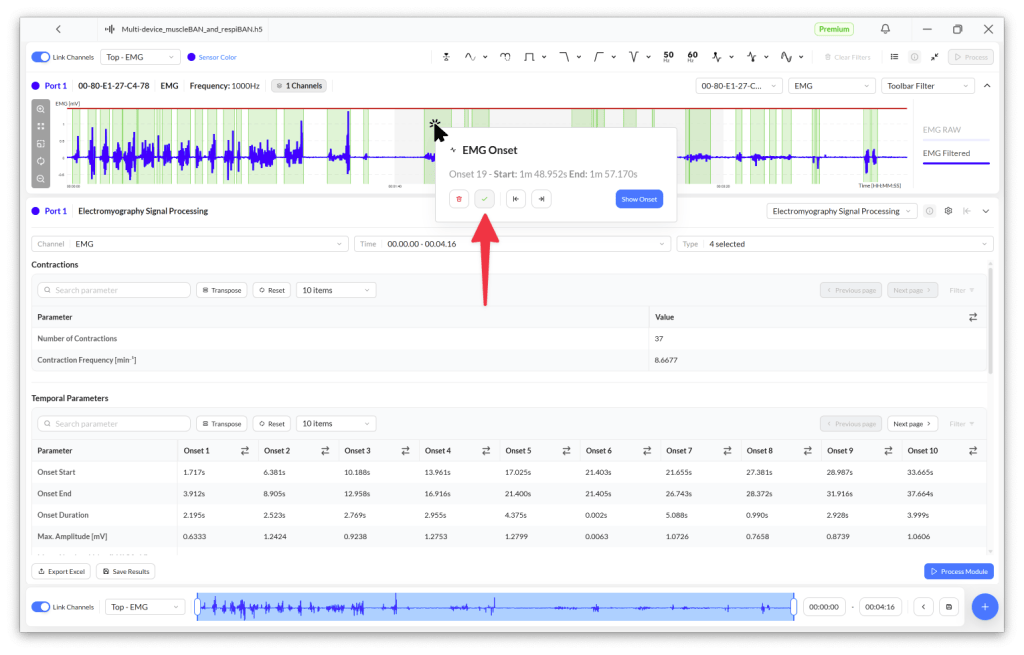
Info
Excluding onsets does not change the onset IDs.
For example, excluding Onset 2 from the series:
→ Onset 1, Onset 2, Onset 3, …, Onset n
results in:
→ Onset 1, Onset 3, …, Onset n
Onset 3 is not renamed to Onset 2.
Manually merge onsets
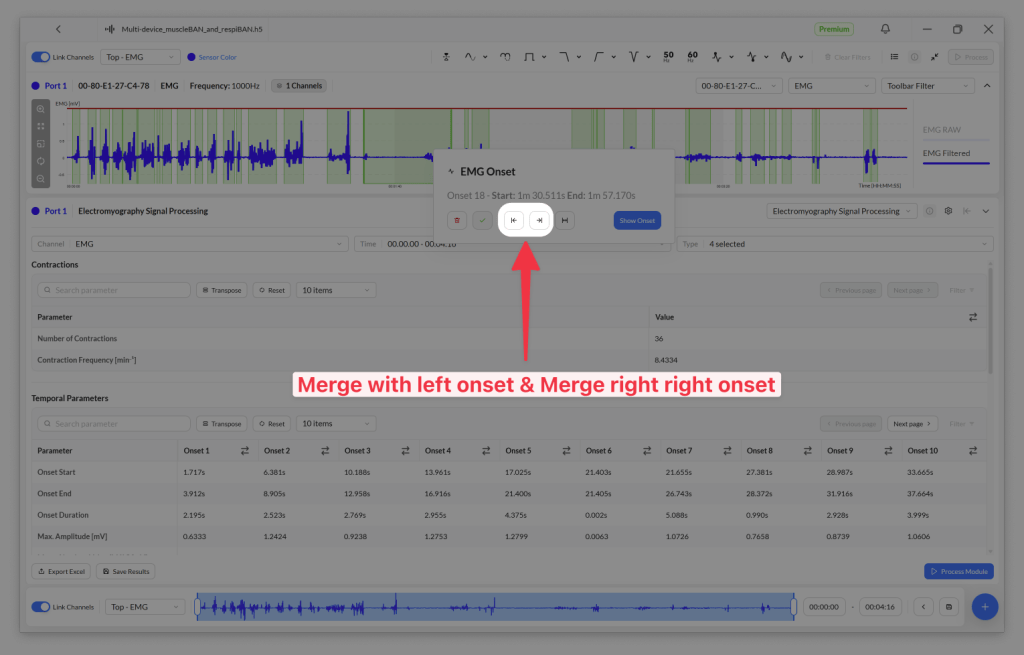
You can manually merge onsets by clicking an onset and selecting whether to merge it with the onset to its left, to its right, or both.
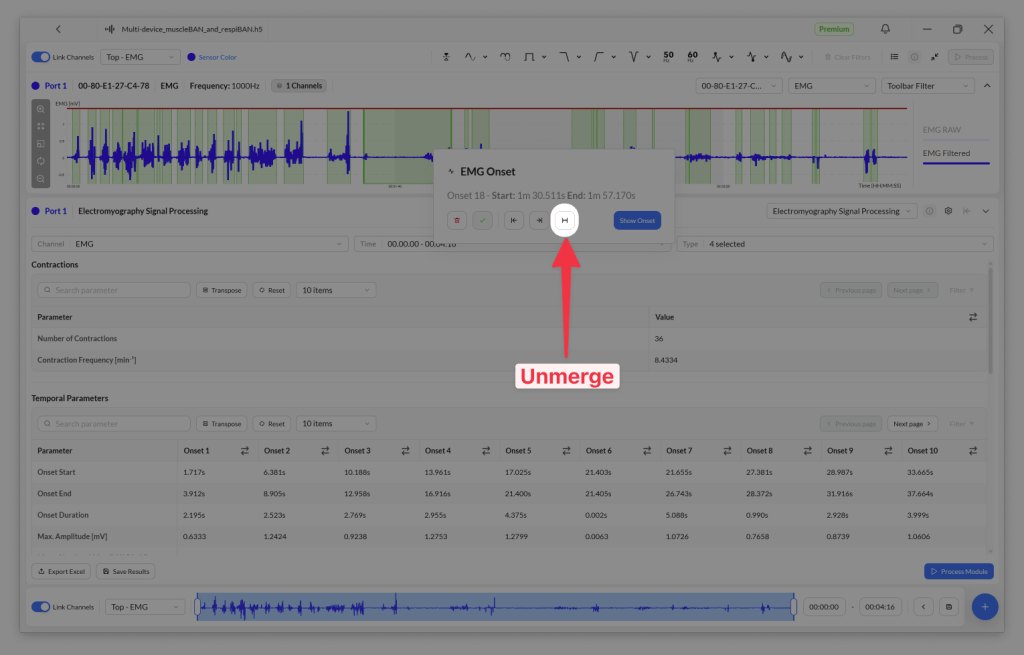
To restore the originally detected onsets, click a merged onset and then the Unmerge button.
Process multiple time windows in the same recording
You can apply the processing module to different segments of your recording. This is particularly useful if a single recording contains multiple phases, for example, a baseline at rest, a series of exercises, and a recovery period.
To do this, adjust the time window using the time axis at the bottom of the screen, then click Process after each selection.

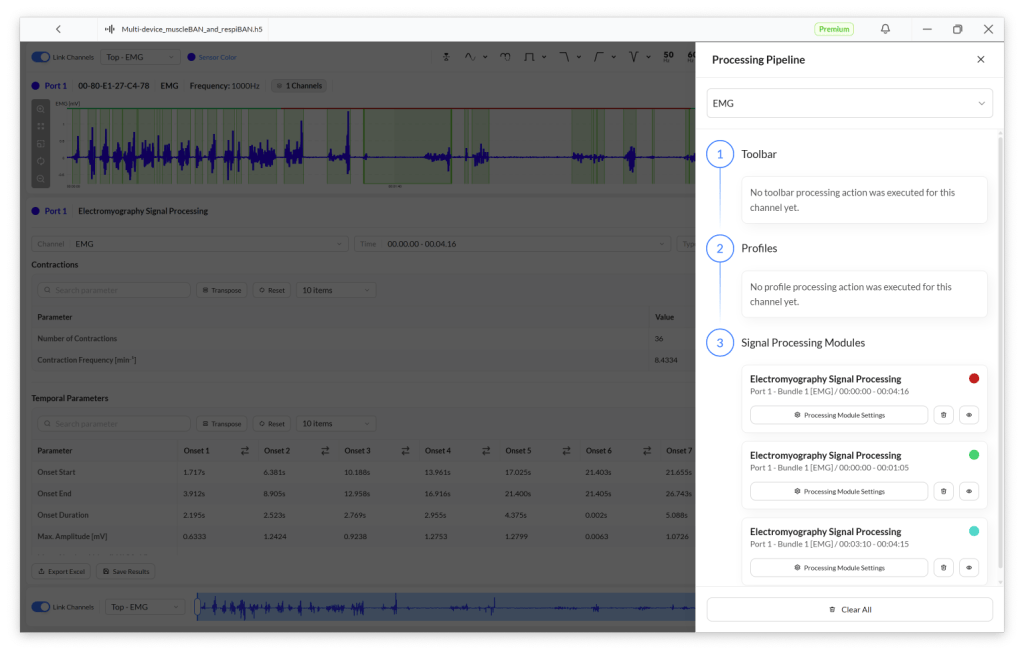
Biosignals Studio does not overwrite previously processed time windows. You’ll find all processed segments in the Time dropdown menu at the top of the module.

To delete a processed segment, click the list icon in the toolbar at the top of the screen and use the bin icon next to the segment.
Datasheet
The datasheet describes the module’s technical implementation in detail, including the pre-processing steps, the formulas used to compute each parameter, and the referenced scientific literature.
