
Biosignals PRO’s power button includes a multi-color LED that provides visual feedback on the device’s current state (example: idle or recording) based on LED color and blinking patterns.
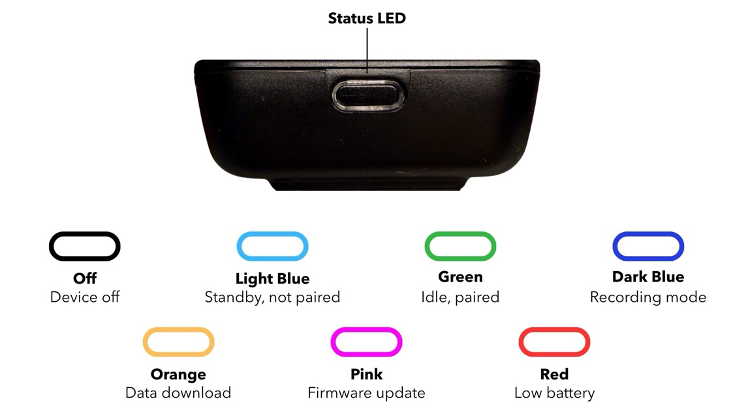
The exact color codes and patterns are visualized below:
| LED Color | Device Mode | Blinking Pattern | Description | |
| Off | Device is off | – | – | |
| Light blue | Standby | Slow (1x per second) | Ready to be paired to PC/Phone/Tablet | |
| Green | Paired & idle | Slow (1x per second) | Ready for: | Recording sessionsDownload sessionsFirmware updates |
| Dark Blue | Recording | Slow (1x per second) | In recording session but not actively recording (ex: paused) | |
| Normal (2x per second) | In recording session and actively recording / logging signals | |||
| Post-Recording Recovery | Very Slow (2x seconds on, 1 second off) | Recordings ended, in 5 min window waiting for sending backed-up data | ||
| Fast (5x per second) | Transferring backed-up data | |||
| Orange | Data Download | Normal (2x per second) | Transferring recording session from microSD | |
| Pink | Firmware Update | Slow (1x per second) | Installing firmware update | |
| Red + Any Color | Low Battery | Alternating Slow (1 per second) | Battery charging level < 20% | |
| Alternating Fast (5 per second) | Critical battery charging level < 5% | |||
| Amber | Device On | – | Matches the color of the current device mode but prolongs the intervals where the LED is ‘on’ | |
| Device Off | Permanent | Charging | ||
| Shortly on then permanently off | Device fully charged | |||
